
Editing, deactivating and reactivating incentives
provider
Pause or resume an incentive without deleting it.
Sometimes you need to temporarily pause an incentive without losing its configuration or edit it. Reco lets you edit, deactivate and reactivate incentives at any time.
Editing an incentive
- Navigate to Incentives from the main menu
- Find the incentive you want to edit
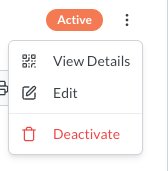
- Click Edit
This will open the same incentive creation panel you would have already used. From here you can make the changes you need.
Deactivating an incentive
Alternatively, you can select Deactivate to stop the incentive being used.
When an incentive is deactivated:
- It is removed from clients' available offers and they can no longer add it to their wallet
- Clients who already have it in their wallet will see it marked as inactive
- No new referrals can be created using this incentive
- Existing referrals that are already in progress are not affected — they continue through their normal lifecycle
Reactivating an incentive
To bring an incentive back, just go to the same menu option and click Activate. The incentive will immediately become available again to connected clients with all its original settings.