Setting up your external review links
provider
How to make it easy for a client to copy paste a review to your main review channels
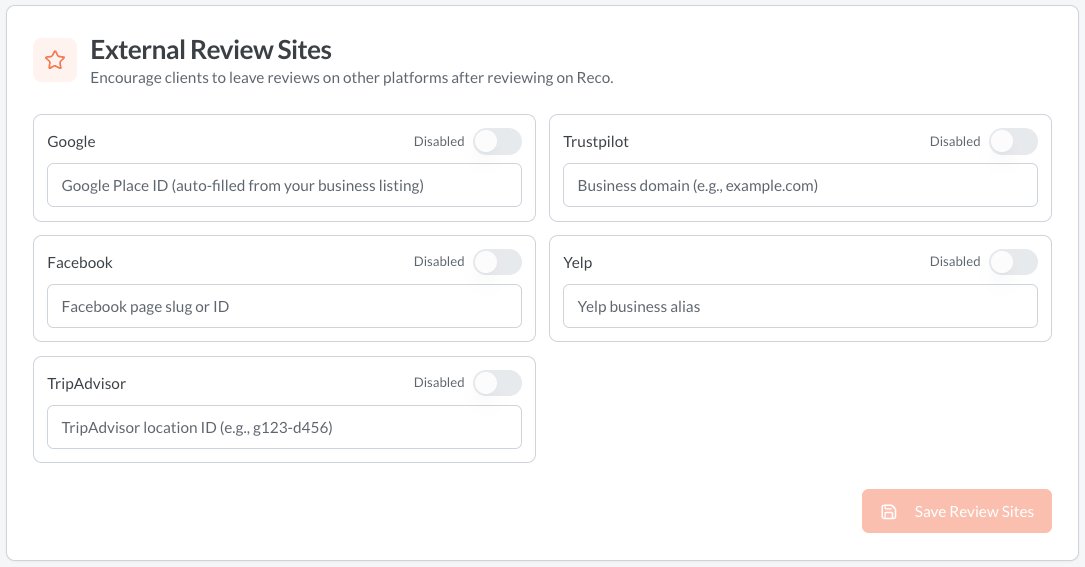
When a client writes a review, they are given the option to copy-paste this review to an external review site you have site up on Reco. Given that most clients leaving a review on Reco will have had a positive experience, it is a good idea to configure this. To do this, go to the Organisation Config page, from the user menu. There you will see the External Review Sites panel. Enter the code for each site you use to collect reviews. Make sure you enable them!
- Google - this is your google places ID. Use this tool to find your placeID
- Facebook - Go to your Facebook Business Page. Look at the address bar in your web browser. Your Page Slug is the text right after the main domain. e.g. https://www.facebook.com/YourBusinessName
- TripAdvisor - Look at the URL in the address bar and copy paste the locationID of the form g552107-d257406
- Trustpilot - Look at the URL in your browser's address bar. Your identifier is simply [yourwebsite.com]
- Yelp - This is simply your business alias from the URL of your business on yelp e.g. https://www.yelp.com.au/biz/[your alias here]