Choosing your account type (Client vs Provider)
Understand the difference between client and provider accounts.
There are two types of account in Reco - a Client of a Provider account, and a Provider account
Client of Provider Account
A Client of Provider account is for individuals who want to refer friends, family, or colleagues to businesses they trust (Providers). As a client you can:
- Save incentives from providers you're connected with
- Share referrals via email, SMS, link, or QR code
- Track the status of your referrals
- Earn rewards when your referrals are activated
- Leave reviews and recommendations for providers
Provider account
A Provider Account is for businesses and professionals who want to attract new customers through referrals. As a provider you can:
- Create and manage incentive offers
- Receive and action incoming referrals
- Manage your team, locations, and organization settings
- Communicate with clients via messaging
- Receive reviews, which clients can easily repost on other channels
Can I be both?
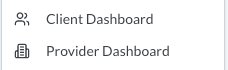
Yes. Your Reco account can function as both a client and a provider. Once you sign up as a Provider, your client dashboard becomes available alongside your provider features. You can switch between views using the User Menu as shown below.
Can I have multiple provider accounts?
Yes. Reco deals with the scenarios where you might work for multiple organizations and/or have your own business. So you can receive referrals for your own business, and as a provider at another business. Your different provider accounts are accessible under the User Menu
Can I become a provider after being a client of a provider?
Yes. Just log into Reco via the web (rather than the app), and go to your profile, and click on Become a Provider