Making your first referral to a Provider
This article covers how to make a referral to a provider
The purpose of Reco is to help Clients of a Provider make referrals to their friends, family and contacts, quickly and easily, and be rewarded in the process. This helps the providers they like and value, to grow their business for less cost, and helps their friends and family find great services.
How it works
Providers set up incentives which have a client reward, and an introductory offer for the person they refer. These incentives may also have terms and limits.
Providers then share these incentives with their clients using a code. This can be done using email, a link, or a QR code. Their clients then use this code to create a unique referral link, that is tied to them, and share this with the person they want to refer using a messaging app of their choice.
Clients do not need to have a Reco account to make referrals. They can just click on the provider's incentive link or scan the QR code. They can continue to check the status of the referral as it progresses whether they have an account or not.
However, by creating an account, a client of a provider can:
- save time making the same referral by adding the code to a wallet
- track referrals they have made in one place
- communicate with the provider
- write reviews for the provider
- make recommendations to providers who are not on Reco
Protecting your Privacy
Referrals can generally be made or received anonymously. However, the provider may require the person making or receiving the referral to share their contact details before receiving the introductory offer or reward. The person making the referral must always verify their contact details in Reco and the person being referred can do this in Reco or in person. Both parties can choose whether to share your contact details with the provider
Making your first referral
There are two ways you can make a referral:
- As a non-logged in user, by clicking on a link or scanning a QR code from a provider
- As a logged-in user, by adding an incentive to your Reco account and generating a referral
Both methods create a unique referral link that is tied to you (the referrer), so you can then track the referral's progress.
The reward and introductory offer could be anything that the Provider thinks is appropriate. Reco has no involvement in delivering either to their clients (see terms for more details).
Clicking on a provider link, or scanning a QR code.
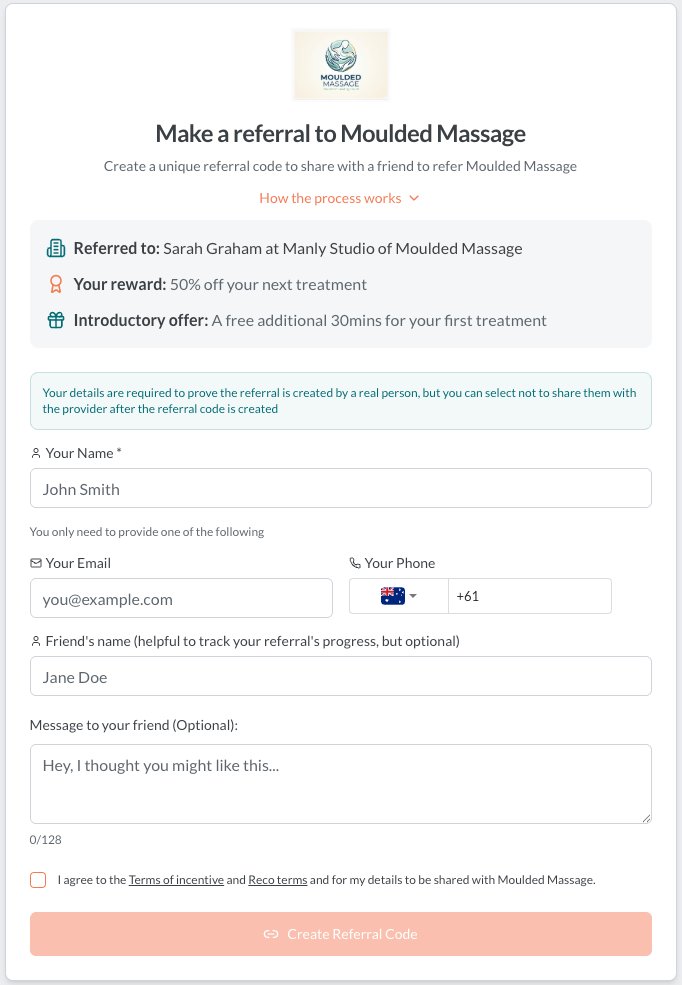
Simply click on the link or scan the QR code provided by your provider. This will take you to a page of the form my.reco.tips/r/[incentive code]. If the provider has given you a link to all their incentives, you can select one that is appropriate for you and/or the person that you are referring.
Then you will complete a form to verify your details - either your email address and/or your phone number. You will then be sent a code to each of these details to verify your details, and can share the referral with your friend using the messaging platform of your choice.
Creating a referral from your Reco Wallet
If you have an account, click on add to wallet, then either scan the QR code given to you by the provider, or enter the incentive code. This will then add the incentive to your wallet so you can re-use it quickly and easily.
Then click the Share button or icon (from the client dashboard) or, from the wallet page of your account to share the incentive via a messaging app of our choice. Alternatively if you are with your friend in person, you can show the QR code to your friend for them to scan and they can fill the details in directly. When they do this, the referral will appear on your dashboard.