
Creating a Referrer Reward
Choose the right reward for your referral incentive.
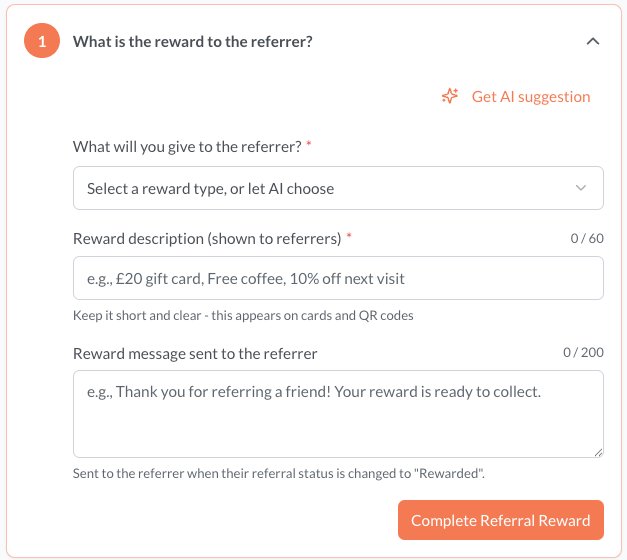
When creating an incentive, you need to decide the reward to offer the person making the referral, which they receive when the person they refer signs up to your service. Reco supports various reward types to give you flexibility in designing your referral program.
Available reward types
| Reward Type | Description | Example |
|---|---|---|
| Gift | Any gift for the client | "A luxury aromatherapy gift set" |
| Cash or gift card | A monetary reward as cash or a gift card | "$50 Amazon gift card" |
| Service Credit or discount | A percentage or monetary discount | "40% off your next treatment" |
| Charity donation | A donation to a charity of your or their choice | "$100 donation to a charity of your choosing" |
| Other | A reward you define in your own words | "A free tyre and oil check" |
Ensure that reward you offer is permitted by any regulation. For example, lawyers, medical and other regulated professions may be precluded certain types of rewards for referrals. There may also be laws around providing alcohol or other regulated products as gifts etc..
Remember that Reco is not involved with distributing or managing rewards.
Choosing the right reward
Consider your business model and what motivates your clients:
- Percentage discounts work well for high-value services where the saving feels significant
- Fixed amounts are straightforward and easy to understand - clients know exactly what they'll get
- Free services can be very attractive, especially if you offer something clients already value
- Custom rewards give you complete flexibility for non-monetary incentives like priority access or novel rewards
Reward Description
The reward description is what the person making the referral will see and what appears as the headline for the incentive in their Reco wallet. Make it clear and unambiguous. The person being referred does not see the reward.
Reward message sent to referrer
This is the message that is sent to the person making the referral, when you change the referral status to "Rewarded". This should thank them and tell them how the reward is going to be provided to them.
Using AI for suggestions
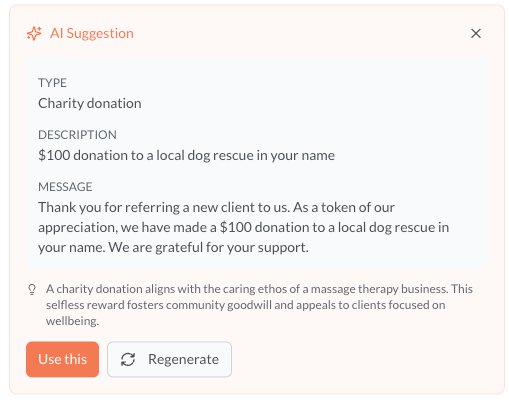
If you need some assistance or inspiration, pressing "Get AI suggestion" will use whatever information you have populated to suggest a reward based on the description of your organization. This is only available if this information has been populated on your organization tab. You can learn more about how to do that here.
For example, if you select Gift as the reward type, AI will suggest an appropriate Gift. If you suggest a specific charity in the reward description, then the AI will develop that and provide a reward message. Give it a try and see if it helps. If you like what it suggests, click Use this - you can always edit it further.
Completing the Reward
When you have completed creating the reward, click on Complete Referral Reward to go to the next step. The link below describes this next step.