
Editing your organisation settings
How to create your organisation description, logo, review links and change its type
You should ensure that your organisation is fully described so that your prospective clients understand your offering, and also so that the Reco AI helper can assist in creating incentives for your clients to refer you.
There are 5 areas that need populating:
- Your business name and web site
- A description of your business
- Dropdowns to categorise your business
- Your logo
- Your reviews links
- Your business structure
You can navigate to this by clicking on the Organisation box on the main dashboard, or from the User Menu, and then clicking on the Overview tab
1. Your business name and web site
You should have populated your business name during set up. However, if you entered it manually, rather than selecting from the drop down, you should correct this. Selecting from the drop down as you type will populate your website, google review page, and link your business to your recommendations page automatically. If you do not have a google place ID, your business will not appear in the drop down and you should enter your business name manually.
2. A description of your business
The better you describe your organisation, the better your prospective clients can understand your services and the benefits to them. A better description also gives our AI tool more information to work with when generating incentives that are appropriate for your business and your clients.
Describe your business
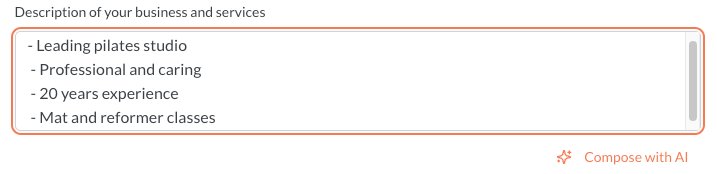
Your business description is shared with prospective clients, so it is important that it is well written and complete. Our AI can help. If you do not want to write the whole thing, just provide notes and press Compose with AI. If you like what it gives you, just click Use this. You can edit this further if you wish. Here is an example of providing notes. The more the better...
3. Dropdowns to categorise your business
Select from the drop downs to classify your business and describe its size and how often your clients use you. This information is also helpful for our AI to develop appropriate incentives.
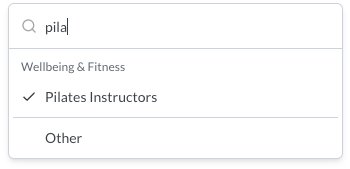
To select a business type, just start typing. If something appropriate does not appear, then select Other at the bottom, and describe your business.
4. Your logo
You should add your logo. This is used on printed material (e.g. referral cards and flyers) and on the client referral page and wallet. A logo makes it easier to identify your business across the incentives that the client has in their wallet.
5. Your Review Links
When a client writes a review, they are given the option to copy-paste this review to an external review site you have site up on Reco. Given that most clients leaving a review on Reco will have had a positive experience, it is a good idea to configure this. To do this, follow the instructions here.
6. Updating your business structure
If you set the business up as having one provider or location but need more, you can change the status so that you can add more providers and/or locations.