
Managing provider locations
Add, edit, and organise your business locations.
If your business operates from multiple sites, you can design incentives which are specific to a location, or a provider within a specific location.
Adding your business location
If you are classified as a Multi Location Business on the Organisation tab of your Organisation Config page, you can have multiple locations.

You can add as many locations to your organisation as you wish. Each location can have one or more providers receiving referrals. You can also have location managers who manage referrals and team member subscriptions for that location across all providers.
How to add a location
- Navigate to Organisation > Locations
- Click Add Location
- Enter the location name (e.g. "Head Office", "City Centre Branch")
- Start typing your address — Reco uses Google Maps to autocomplete and verify the address
- Confirm the address details or enter manually
- Select your role at this location click Add Location
If you select that you are a provider for the location, then an extra subscription is required to receive referrals at that location, because each location needs at least one subscription. This is managed in Subscriptions
Managing multiple locations
If your business operates from more than one site, you can add as many locations as you need. Each location can have:
- Its own name and address
- Team members assigned specifically to that location
- Referrals tracked per location or provider at that location
Editing or removing a location
To edit a location, click on it from the Locations tab and update the details.
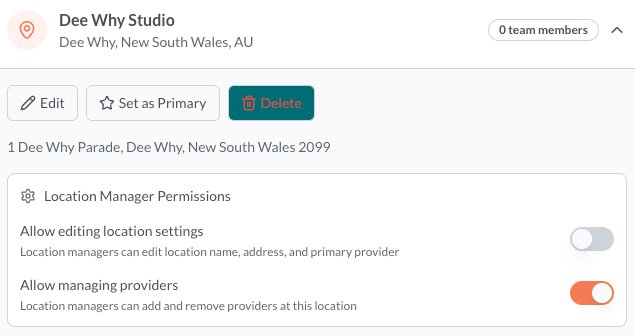
Setting as Primary Location
Setting a location as a primary location, means that any incentives that are configured for all locations, are managed at this location
To remove a location
You can only remove a location when there are no team members associated with it. So remove these from the location first then click delete. You might then also be able to reduce the number of subscriptions and save cost.
Location manager permissions
You can set the permissions for Location managers so that they can manage the details of the location, and/or providers. They automatically get visibility to all referrals associated with that location