
Setting expiration dates and claim limits
Control how long your incentive runs and how many times it can be claimed.
Reco makes any reward possible for any business, so it is important to consider how these might be redeemed. Reco makes it possible to:
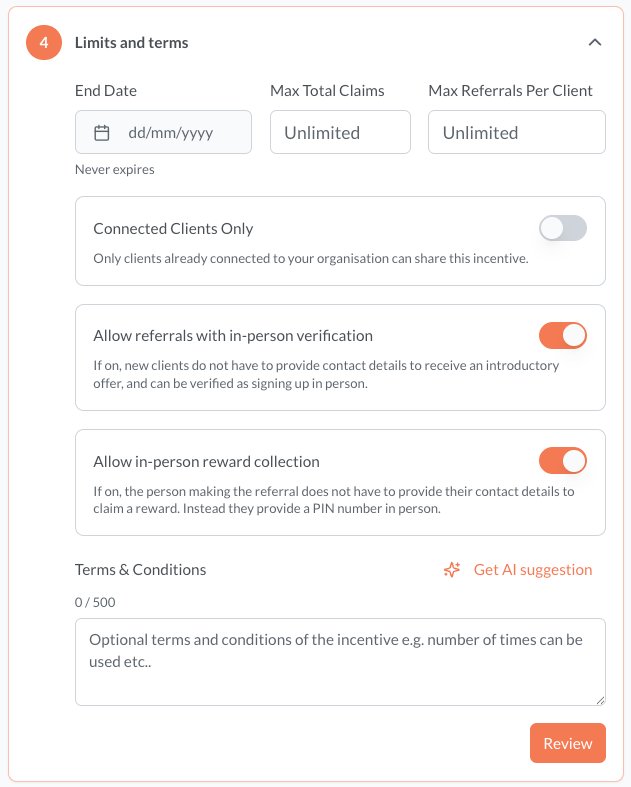
- Set when your incentive expires
- Control how many times it can be referred by one person or the whole organization
- Limit the use of the incentive to clients who you can see on your Connected Clients page
- Require that contact details are shared to receive a reward or introductory offer
- Describe any other relevant terms for use of the incentive
Such controls can help you manage demand and run time-limited promotions, and deal with potential abuse patterns.
Expiration dates
You can set an end date on any incentive. After this date:
- The incentive will no longer appear for new clients to add to their wallet
- Clients who already have it in their wallet will see it marked as expired
- No new referrals can be created using the expired incentive
To set an expiration date, use the End Date field when creating or editing your incentive. Leave it blank for an incentive that runs indefinitely.
Claim limits
Claim limits let you cap the total number of times an incentive can be used to make a referral:
- Total claims limit — the maximum number of referrals that can be activated using this incentive across all clients
- Per-client limit — the maximum number of times a single client can use this incentive
Combining limits
You can use expiration dates and claim limits together. For example:
- "First 50 referrals get £25 off — offer ends 31 December" uses both a claim limit and an end date
- The incentive will close when either condition is met — whichever comes first
Monitoring usage
Keep an eye on your incentive's performance from the Incentives page. You'll see how many claims have been made against the total limit, so you can plan ahead and create follow-up offers if needed.
Connected Clients
Connected clients are those that have already added your incentives to their wallet. This means they have a Reco account and are the most engaged with your service. You can limit the use of the incentive to these users and the incentive is not available to be used from public links.
Allow referrals with in-person verification
If this is on, it means that the person being referred can choose to be verified in person, rather than have to verify their contact details online. This is done by scanning or entering a code at the point that the person referred seeks to sign up to your service. This deals with any privacy concerns they may have. For example, you might not want to share your contact details with a rarely used service e.g. car mechanic.
If this is off, then the person being referred cannot accept the referral without sharing their contact details.
Allow in-person reward collection
If this is on, it means that the person making the referral can choose to verify that they were the ones that made the referral without sharing their contact details. This is done by the referrer providing a code and a PIN when they try to redeem the reward.
If this is off, then the referrer can still make referrals even if they do not want to share their contact details. However in this situation they are advised that the conditions of the referral require these to be shared in order to receive the reward and they must get in touch directly with the provider to discuss further if required.