
Viewing your connected providers as a client
client
See all the businesses you are connected to on Reco.
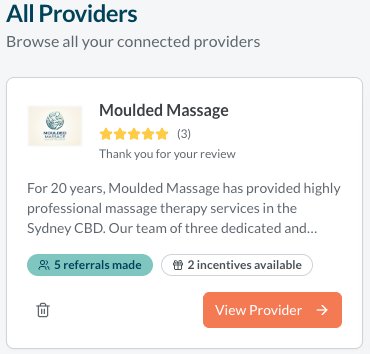
Your connected providers are the businesses you've interacted with on Reco - either by adding their incentives to your wallet or making a referral. These appear on the Providers page.
Where to find your providers
Navigate to Providers from the main menu. Here you'll see a list of all businesses you're connected to. You can select one and this will show more detail of:
- The incentives they currently have available
- The referrals you have made or received with them
- The reviews you have written for the organisation or an individual provider. Read more here.
- The messages you have with the provider or their team members. Read more here.
- A description about the organisation
The provider sees you as a connected client - but not your contact details if you have chosen not to share these in your privacy settings.
Managing your connections
Your connections are maintained automatically. If you want to disconnect from a provider, just delete them using the bin icon.