
Making referrals as a Client of a Provider (with an account)
This article provides all the details about how to make a referral if you have an account on Reco.
A referral is when you recommend a service provider to someone you know - your friend, family member, or colleague. Providers create incentives and these usually offer rewards to you (the referrer) and special offers or discounts to the person you refer (the referee).
By using an incentive in Reco you create a unique referral link for someone which you can then share and track. Each referral has a unique short code (e.g. AB12CD) so you can track it.
Making referrals with a Reco account is easier and keeps everything tracked in one place. It also makes it easier for you to follow up.
How to Make a Referral
There are two ways to refer someone if you have a Reco account:
1. Starting From Your Wallet
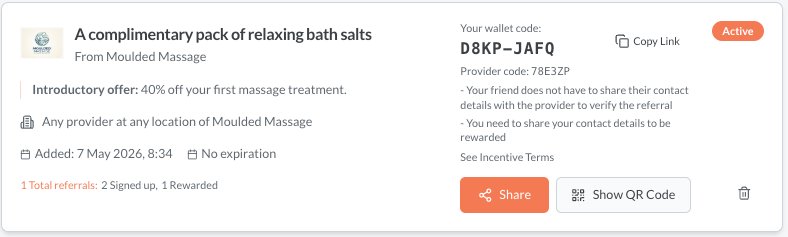
Your wallet is where you keep the incentives you want to share with friends, family, and colleagues. Think of it as a collection of referral offers ready to go.
When you add a provider's incentive to your wallet, you create your own version of it, and any referrals you make are then linked to you. The web version of the wallet card is below. Learn how to make referrals from your wallet here.
2. Use an Existing Referral to "Refer Another"
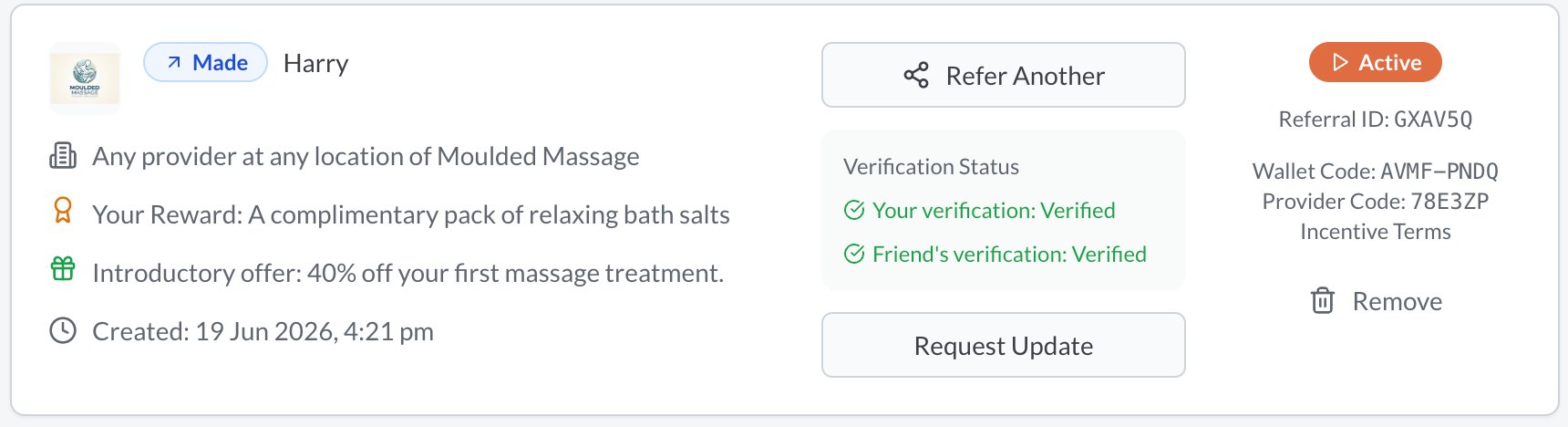
Simply find a referral you have made to someone else, and click on "Refer Another" if you are on the web. This is in the 3 dot menu of the mobile or app version of Reco. This creates a new unique referral, unrelated to the one you just clicked on.
3. Using a Provider Link Directly
If a provider has shared their referral link or QR code publicly (on their website, social media, or in person), you can use it directly without needing an account. This follows the same steps for if you are creating a referral without an account. But if you are logged in, your details are automatically populated. Learn more about how to do that here.
Reco never stores the personal details of the person being referred, until they accept the referral and provide them themselves.
What Your Friend (the Referee) Does After the Referral is Made
- Your friend opens the link you shared using your messaging app
- If they choose, they can enter their details (name, email or phone) and give consent for Reco to share these with the provider. Alternatively they can accept the referral in person and not share contact details with the provider.
- They receive a verification code to confirm the these details
- Once they verify, the referral becomes Active.
- When they sign up up to the service, you are eligible for any reward associated with the incentive.
What the Provider Does
Once your referral is Active (both parties are verified):
- The provider is notified — They receive your friend's details and the referral information. This might also be done by your friend accepting the referral in person, without sharing their contact details.
- The provider contacts your friend — They should reach out to offer their service
- The provider updates the status — After your friend uses the service, the provider marks the referral as Signed Up.
- The provider processes your reward — Once confirmed, they mark the referral as Rewarded
You don't need to do anything during this stage — the provider handles it. But if things seem to be taking a while, you can give them a nudge (see below).
How to Reshare a Referral Link
If your friend didn't receive or lost the referral link, you can reshare it:
- Find the referral on your My Referrals page
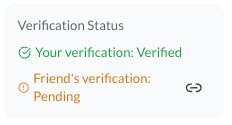
- Tap the Link button on the referral card (next to Friend's verification: Pending)
- The original link they can use is copied to your device and you can paste into any messaging app you choose
Tracking Referrals
Learn about tracking referrals here.
Tips for successful referrals
- Refer people you genuinely think will benefit — quality referrals are more likely to convert
- Add a personal message — a note from you adds a personal touch and increases trust
- Follow up personally — let the person know you've sent them something, especially if they might not recognise a Reco notification
Read next
- Prompting a provider for an update on a referral>>
- Making and claiming referrals anonymously>>
- Tracking your referrals and their status>>
Glossary of Terms
| Term | Meaning |
|---|---|
| Referrer (You) | The person who recommends the provider to a friend |
| Referee (Your Friend) | The person being referred to the provider |
| Provider | The business offering the service and the referral incentive |
| Incentive | The referral programme from teh provider, that includes the reward for you and the offer for your friend |
| Wallet | Your personal collection of provider incentives you can share |
| Referral Code | A unique 6-character code identifying a specific referral |
| Verification | Confirming your identity via a code sent to your email or phone |
| Short Code | The code in your /c/ status link (same as referral code) |